Version Releases
A complete history of Midivex releases. See what shipped in each version and what’s coming next.
New MIDI Mapping Window and New Features for the Trax Drum Sequencer Module
Midivex 2.0 brings the new MIDI Mapping window, and Trax lets you arm and play straight into the grid, generate more of the beat for you, and switch the same beat to any kit.
MIDI Mapping
Map your controllers to everything
One window for every mappable control in Midivex, including Trax. Learn it from a knob or button, or pick the CC or note by hand. Works with Stream Decks, footswitches and any MIDI controller.
Trax
Play straight into the grid
Select your MIDI input device, a keyboard or a set of pads. Hit Arm, turn on the click and press Play, then record your beats directly to the grid. Quantize on the fly, or later.
Set your swing interval
Swing in 8ths while you program in 16ths.
More ways to generate a beat
Pick a genre and how many instruments play, and it writes the groove. Then generate percussion, cymbals, fills, FX and sample parts on top. Keep every section the same, or let each one vary.
One beat, so easy to switch your kit
Hear it direct from your drum machine, then switch the map and try it on a plugin or a multitimbral synth. No remapping. Now with 20+ maps.
Add your own kit map
If we don’t already have a map for your kit, it’s easy to add one. Pick from 50+ instrument types, audition each sound as you go, and drag rows into order.
It's all about the groove
Nudge notes late or early, one hit or a whole lane, for that lazy or tight feel. The grid shows exactly where each one lands.
Share your beats as packs
Export one beat or a whole pack as a single file, and import packs straight into your library.
Share your kit maps
Export a map as a file, or import one someone else has built.
Improvements
- Switch routes on and off from any controller, including several at once.
- Tighter playback, the click now lands on the beat, and optimised CPU usage.
- Give any lane a Role, so Create and Modify know what it plays.
- Text Size: make the whole app bigger or smaller in Setup, or with Ctrl/Cmd + and −.
- Pick your accent colour in Setup, as in Miditrax.
- Fixes, including signing in no longer blanking the window and the Windows uninstaller working again.
Trax: a Full Drum Sequencer, Built In
Midivex 1.4.0 adds Trax, a generative drum step sequencer built right into the app, plus quick Bank and Program steppers on your active devices, two more synths in the preset database, and window sizing improvements.
Trax
Trax drum sequencer
Trax turns Midivex into a drum machine. Pick a kit map for your hardware drum machine or a drum VST, generate a groove, then shape it live. It drives any MIDI drum machine or multitimbral synth in your rig.
- Generate a beat from a style and density, then push it with Variation, Cymbals and Percussion
- Per-step Velocity, Ratchet, Gate, Pitch, Octave, Chance, Timing and Length, not just on or off
- Up to eight patterns per beat (A to H), each with its own Fill, queued live at the bar
- Swing, accents and micro-timing across the whole beat or a single lane
- Built-in kit maps for General MIDI and many popular drum machines and drum VSTs
- Also ships as Miditrax, a standalone app. Your Midivex Pro licence includes it at no extra cost
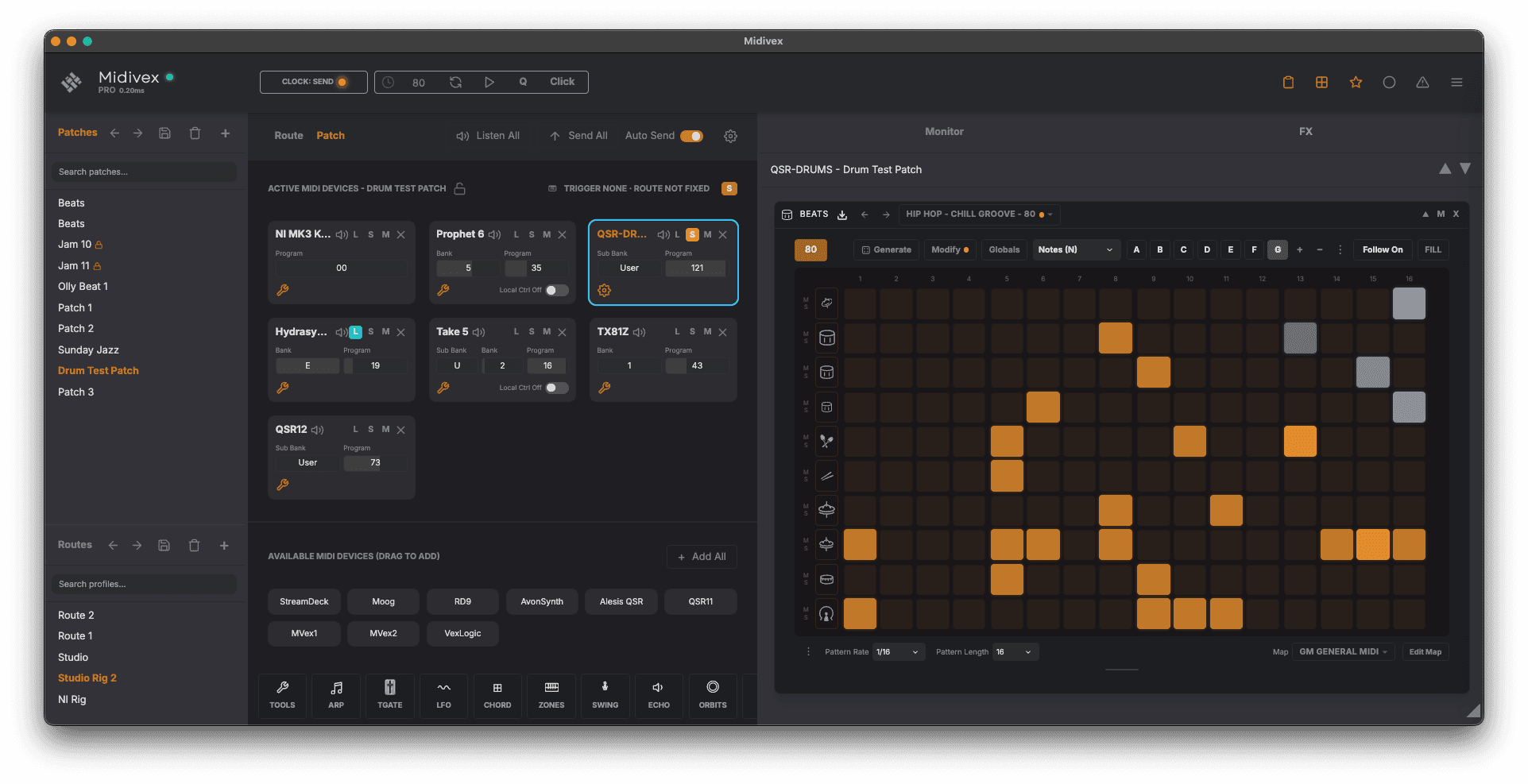
New to Trax? The Trax setup guide walks through it step by step.
Devices and Sounds
Bank and Program steppers on active devices
Every active device in a patch now has plus and minus steppers for Bank, Sub Bank and Program, so you can audition patches on your synth without diving into front-panel menus. The steppers are MIDI-mappable too.
Two new synths in the database
Added the Roland JD-990 and JV-2080 to the synth preset database, bringing it to 30 supported devices with full patch names ready to recall.
Polish
Window sizing
Midivex remembers its window position and size between sessions, and reserves the extra room it needs automatically when you open Trax, so the grid always has space to breathe.
Six New Features for Live Performance
Hands-free Latch and Hold, per-synth volume faders with fade-ins, lockable patches you can play freely all session, a Spotlight mode for hopping between synths on a single controller, two new chord voicings, and diatonic-aware chord modifiers.
Live Performance
Latch and Hold
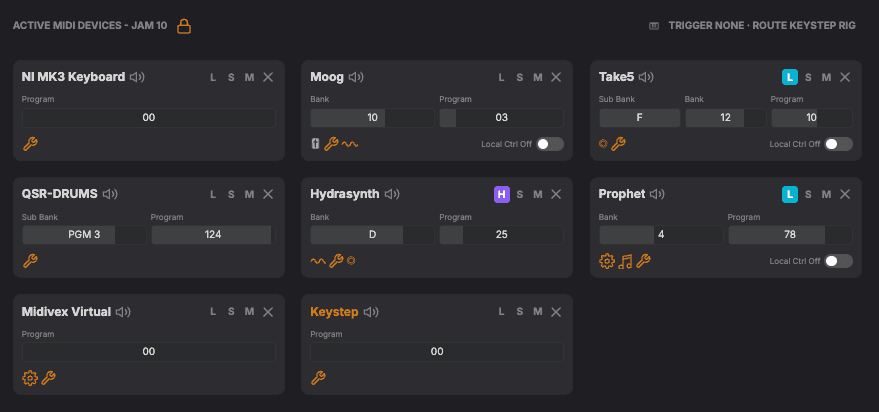
Engage Latch on any active device to play hands-free. Tap a note to play, tap the same note to stop, or switch to Hold to stack notes one after the other. Latch state is per-device and remembered in the patch.
- Lay down a sustained pad on one synth and play melody on top without a hand on the keyboard
- Latch a chord, switch chords cleanly with a single press (the previous chord releases)
- Hold mode stacks notes additively for evolving textures
- Per-device, so different synths in the same patch can be in different latch states
Volume Fader and Fade-Ins
Each synth in a patch can have its own volume fader, mappable to any hardware controller, with a start position (a small triangle under the fader) so patches load at the volume you want and fade in live.
- Set a fade-in patch to start at 0 and bring it up live with the mapped fader
- Soft takeover prevents the synth jumping when the hardware fader does not match the slider position yet
- Works with hardware synths automatically. VSTs may need a one-time MIDI Learn inside the plugin
Patch Workflow
Patch Lock
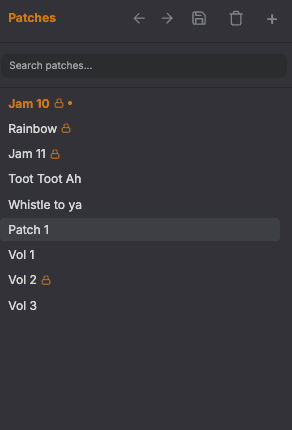
Lock a patch and play it freely all session without losing the original. Reload anytime to start clean for the next take.
- Tweak LFO rates, chord keys, trance patterns, mute and solo balance during a 20-minute jam without committing changes
- An orange dot on the patch shows when your live state has diverged from the locked snapshot
- Switching to a different patch reverts the locked one automatically, so only the patch you are playing can drift
- Unlock prompts before discarding the snapshot, since that cannot be undone
Spotlight
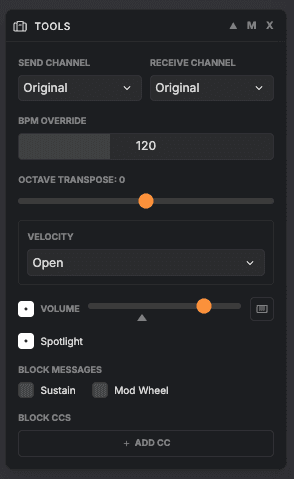
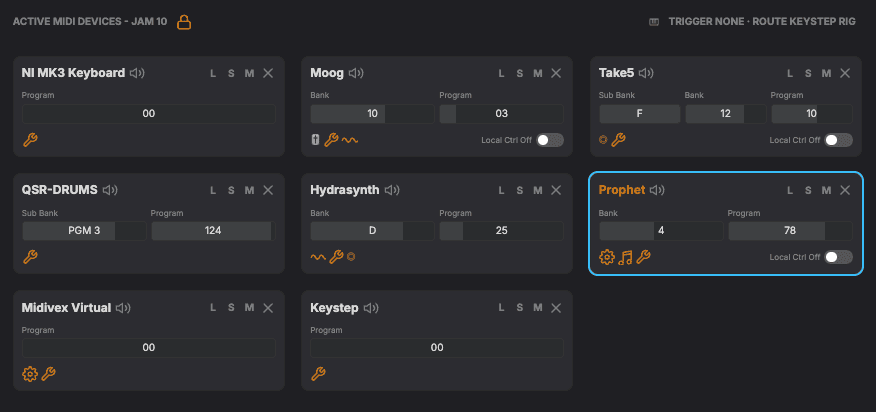
Got several synths with MIDI routed to one keyboard controller? Enable Spotlight in the Tools effect and your controller just sends MIDI to the highlighted synth. Highlight another synth to auto-switch to that route.
- Audition each synth in a multi-synth patch with one click, no muting or routing changes
- A sky-blue ring around the active target makes the current destination visible at a glance
- Latched notes on the previous target keep playing when you switch
Chord Effect
Two New Chord Voicings
Two new entries in the NI Layout’s voicing menu, alongside Classic, Wide, Cinematic, and Fifths.
- Barry Harris, the classic jazz tonic-6 / passing-diminished approach. Tonic-6 inversions on chord-tone degrees, symmetric diminished-7 on passing-tone degrees. Tonic flavour follows the active scale (major 6 in major and mixolydian, minor 6 in minor and dorian)
- Quartal, stacked diatonic fourths from the played note. Three voices by default for the canonical modal sound (think McCoy Tyner or So What). Diatonic 4ths, not forced perfect 4ths, so the voicing always sits in the active scale
Smarter Chord Modifiers
The Chord effect’s modifiers stay in your chosen key automatically. Hold any modifier with any chord and it always sounds musical.
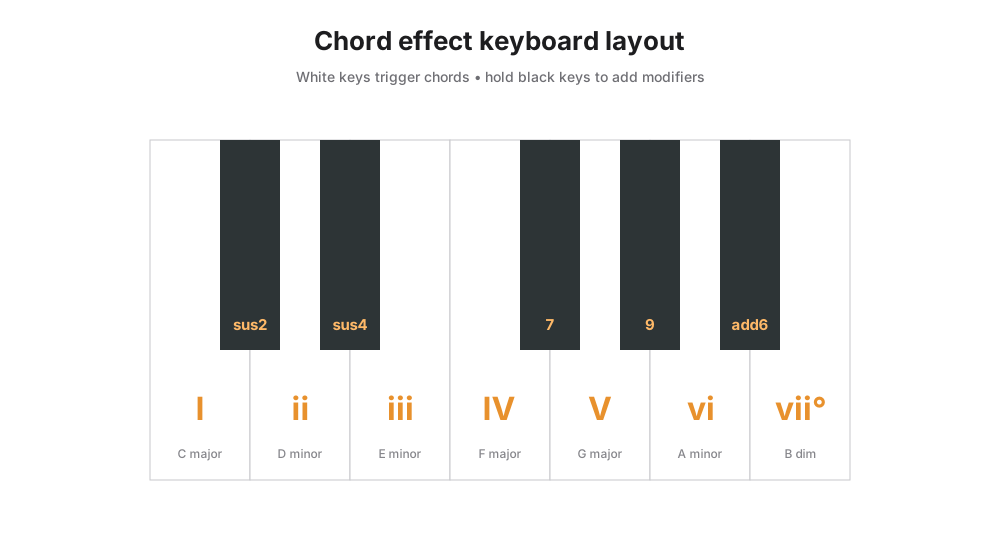
- The “7” picks the right seventh for the chord, major or minor
- The new “add6” gives the sixth that fits the scale
- “sus2” and “sus4” follow the key too
Reliability and Polish
Smaller fixes that add up
- Latch and Hold release correctly on virtual ports (VST targets like Omnisphere now stop on transport STOP, panic, and Latch toggle)
- Panic now releases VSTs that ignore CC 123 All Notes Off (per-pitch NoteOff sweep)
- Patch load sends the volume start value twice (30ms and 200ms) so slow synths whose program-load resets CC 7 still end at the intended volume (Alesis QSR drums confirmed)
- Volume slider MIDI Learn pre-catches takeover, so the first map jumps immediately like subsequent remaps do
- Volume rescue on patch exit uses max(start, current, 50) so abandoned synths land at an audible level without overshooting fade-in patches
- Chord effect no longer silences notes still claimed by an overlapping active chord (e.g. F-major no longer loses A and C when A-minor releases)
Chord Composability, Cleaner Clock Receive, and Arp Sustain
A small follow-up to v1.3.0, focused on making the Chord effect compose cleanly with Arp and Trancegate, tightening start and stop in clock-receive mode, and adding a new Arp Sustain option.
What’s New
Using Chord with Arp and Trancegate
Chord was not passing its modifiers (sus2, sus4, maj7, dom7, 9) through to Arp and Trancegate, which could cause notes outside the key to play in those effects. Modifiers now pass through cleanly so downstream patterns stay in key.
Clock Receive Mode
Cleaner start and stop of MIDI effects when Midivex is following an external clock. Effects wait for transport play before firing and stop cleanly when the sequencer stops.
Arp Sustain
A new Sustain option keeps the arp cycling through one full pass of the currently held notes after you release, so the next chord can land on the beat without a gap. The cycle length scales with both rate and chord size.
A Bigger, Smarter Midivex: Meet the New Tools
v1.3.0 adds three new MIDI effects, and Lite (Free) users get more access to manage their MIDI workflows. Full walkthroughs of every effect are in the MIDI Effects guide.
New Effects
Chord
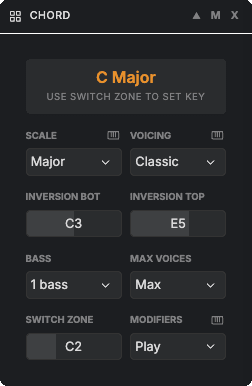
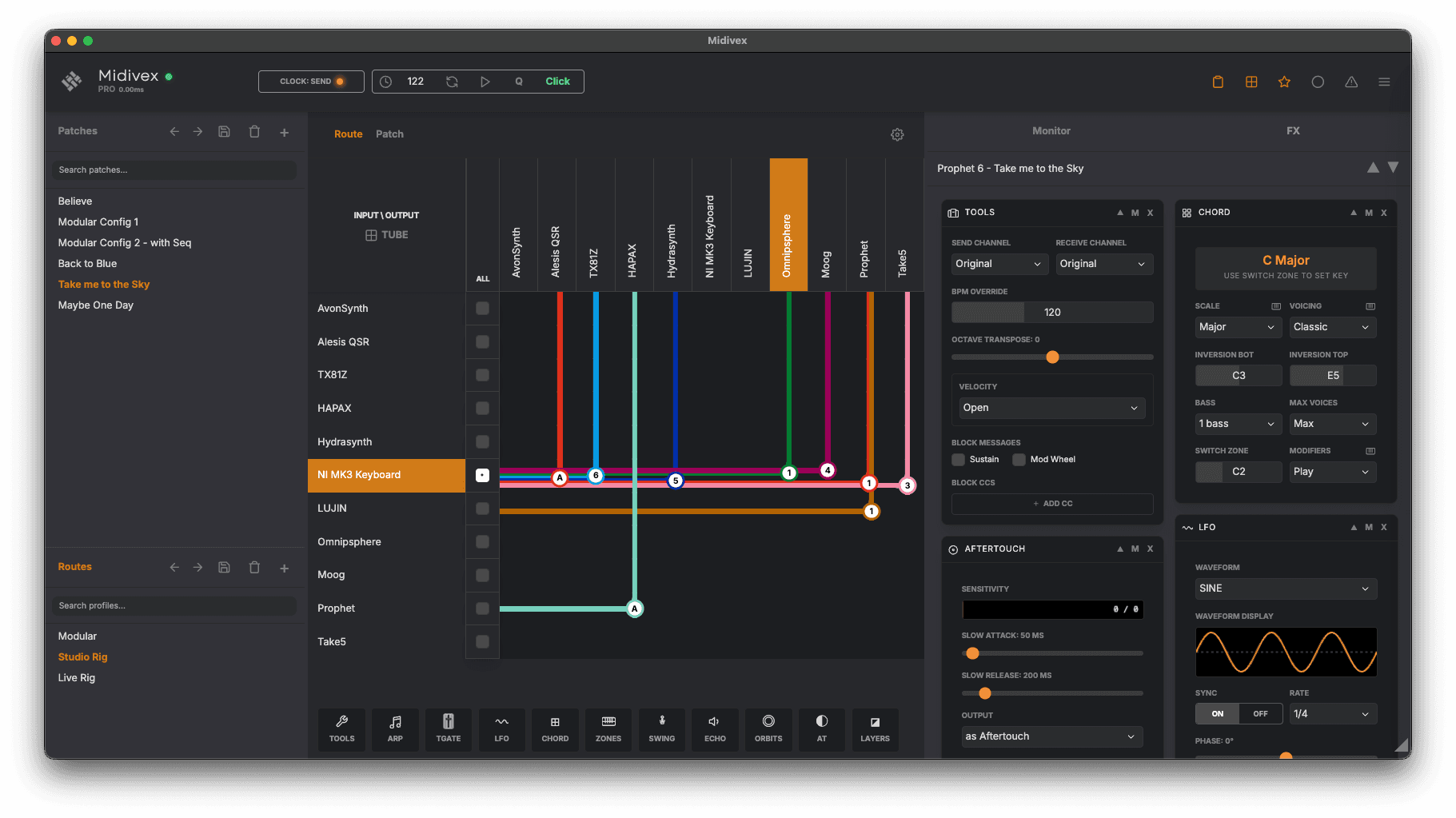
Included in LitePlay rich chord voicings from a single key. Choose a scale and a voicing, then use modifier keys on your controller to swap between chord qualities and add colour, all without needing expert keyboard skills.
- The white keys play the chords of the scale
- Hold down a black key whilst playing a white key to add sus2, sus4, maj7, dom7, and 9th on the fly
- Four scales: Major, Minor, Mixolydian, Dorian
- Four voicings: Classic (triads), Wide (adds the top octave note), Cinematic (includes a 9th), Fifths (root and fifth only)
- Inversion Top and Bottom, if you play too high, the top notes invert down an octave to keep the chord in a useful register
- Bass, 1 Bass includes the bass note one octave below, 2 Bass includes both one and two octaves below
- Max Voices, most scales need four or five voices, reduce here for paraphonic synths
- Switch Zone, maps the key to a range of notes, tap any note in that range to change key as you play
- Modifiers, Play mode lets you play a chord and add a modifier to hear it immediately; Silent mode holds the modifier first, then adds it when you play the chord
Layers
Crossfade or layer between two synthesizers with any CC controller. Defaults to the mod wheel but any fader or knob works. Great for evolving sound movement, or for stacking to increase dynamic range and tone.
- Crossfade mode, source fades down as destination fades up
- Layer mode, destination fades in while source stays untouched
- Leave the source blank to use Layers as a remote volume mixer for synths that are out of physical reach
- Output as CC7, CC11, or both simultaneously
Aftertouch
Shape the response of Mono Aftertouch with attack and release slew. A live visualizer shows aftertouch coming in against your slew curve, so you can dial in exactly how responsive the synth feels.
- Firm up a synth with over-sensitive aftertouch
- Slow Attack, ramps aftertouch in gradually as you press into the key
- Slow Release, holds aftertouch on the way out for a smooth tail as you release
- Output, remap aftertouch to Pitch Bend or any CC the synth supports (filter cutoff, resonance, mod depth, and more)
Workflow & Updates
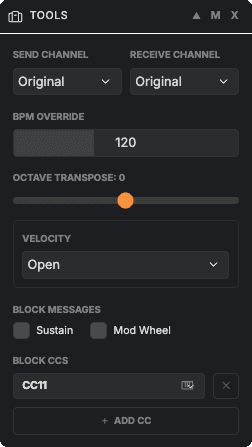
Tools, Now a Powerful MIDI Transposer
Tools has grown from a simple MIDI changer into a powerful MIDI transposer. Use it to tidy up messy controller data, force a synth onto a specific channel, transpose on the fly, or override tempo for sync-dependent effects downstream.
See the MIDI Effects guide for a walkthrough of every effect.
Multi-Column FX Panel
Widen the main window and your effect chain reflows into two, three, or four columns, so you can see your whole setup at a glance.
Patch Recall via CC or PC
Trigger any patch from a keyboard, foot controller, Stream Deck, or Lujin. Patches can also be linked to a Route Profile so one trigger switches your whole setup.
Echo Visualizer & Tighter Trancegate Timing
Echo gains a live tap visualizer in the panel header. Trancegate stepping and chord handling are tighter in both Send and Receive sync modes.
Reliability
Stability Fixes
- Metronome click warm-up: the first click after idle now lands on the beat
- Fixed a startup race where an LFO on a patch device could block route playback
- Cleaner transport stop, fewer stray notes on rapid stop-to-start sequences
Virtual MIDI Clock Passthrough & Performance Improvements
Adds support for MIDI clock passthrough on virtual ports for tighter DAW integration, alongside stability fixes and performance optimizations.
Improvements
Virtual MIDI Clock Passthrough
Virtual MIDI ports now pass through MIDI clock messages, enabling reliable clock sync between Midivex and your DAW via virtual ports. Previously, clock messages were filtered by the MIDI driver layer and never reached the app.
Optimizations & Stability
- Reduced CPU usage option for LFO and Orbits visualizations on lower-powered machines
- Improved startup reliability on systems with virtual MIDI devices
- Better handling of MIDI system messages on Windows with loopback drivers
Windows Release, Metronome Click, Note Quantize & Timing Improvements
The first official Windows release alongside new transport tools, improved timing accuracy for clock-synced effects, and continued refinements to multi-timbral device support and the synth preset database.
New Features
Microsoft Windows Release
Midivex is now available as a fully certified application for Microsoft Windows. Code-signed and ready to install on Windows 10 and 11 (x64).
Metronome Click
Add a click to your transport with the new metronome toggle in the transport bar. Click volume and pitch are adjustable from the Setup panel, with accented beats on beat 1 for easy orientation.
Note Quantize
A global input quantize (Off / 1/8 / 1/16 / 1/32) snaps incoming NoteOn messages to the nearest clock grid boundary, keeping arpeggiator and trancegate retriggers tight to the beat when free playing. Cycle through rates with the Q button in the transport bar.
Master Solo Toggle
A group solo button in the Active MIDI Devices header lets you turn off all soloed devices at once, preventing invisible solo blocking when switching between patches.
Synth Preset Updates
Improvements to the cloud-based synth preset system to handle a wider variety of program change formats for more MIDI instruments. New support for custom bank labels and a sub-bank-only mode for synths with non-standard bank organisation.
Bug Fixes
Stability & Reliability
- Arpeggiator and trancegate timing improvements — tighter step accuracy, reliable gate durations, and cleaner transport stop behaviour
- Local control now restored correctly on app exit and Clear All
- Mute and solo state cleared automatically when a patch device is removed
- Chord display now shows chords for the selected device only
- Multi-timbral devices now receive program changes on their specific MIDI channel
New Orbits Effect, Multi-Timbral Device Support & Active MIDI Visualisation
A major feature release adding a new generative effect, native multi-timbral device support, a live cloud-synced synth preset database, and a redesigned setup experience with dozens of quality-of-life improvements throughout.
New & Updated Effects
Orbits (New)
A generative note engine powered by physics simulation. Drops bounce inside a rotating container, triggering scale-quantised notes on each wall collision.
- 6 container shapes from triangle to octagon
- Configurable gravity, ball speed, bounce energy, and container size
- 11 built-in scales with selectable root note and octave
- Impact-based velocity — harder collisions play louder
- Trigger mode turns your keyboard into a generative instrument
- Up to 12 simultaneous drops with adjustable lifetime
Zones (Redesigned)
Zones has been completely redesigned from a simple note range filter into a full keyboard split effect. Create up to 8 independent zones, each with its own output device and MIDI channel. Overlapping zones layer automatically, a Zones Only toggle controls whether notes outside your ranges pass through or are blocked, and a live voice monitor shows active note counts per zone. Zone boundaries support MIDI Learn so you can set split points by playing a key.
Multi-Timbral Devices
Sub-Device Support
Any output device can now be set to multi-timbral mode, splitting it into named sub-devices with their own MIDI channels and synth profiles. Each sub-device appears independently in the route matrix and patch grid. Ideal for groove boxes and multi-timbral synths like the Novation Circuit Tracks.
Live Synth Database
Cloud-Synced Presets
The synth preset database is now hosted on our server and can be synced on demand from the Setup panel. New presets are added regularly and will appear in your app without needing to update. Your custom device configurations are always preserved and take priority over remote data.
Display-Value Patch Format
Patch addressing now uses human-readable values throughout. Bank and patch numbers match what you see on your synth’s display, with Midivex handling the MIDI translation automatically. Supports numeric and alphabetic bank labels, sub-banks, and flexible start indices. Learn more in our Custom Device Presets guide.
Patch & Routing Improvements
Local Control Toggle
Toggle local control on or off directly from patch device cards. When off, the synth’s own keyboard is silenced so only effects and routed MIDI produce sound. Supports both CC 122 and NRPN methods depending on the device.
MIDI Activity Visualisation
Patch device cards now glow when MIDI is playing through them. Teal indicates direct play from the synth’s own keyboard, amber indicates notes arriving from an external controller or effect. A subtle border pulse gives you instant visual feedback across your whole setup.
Auto Send Toggle
A new toggle controls whether selecting a patch automatically sends program changes to your devices. Disable it to browse patches in the UI without changing sounds, then use Send All when you are ready.
Tools: Channel Override
The Tools effect now includes send and receive channel dropdowns, allowing per-route MIDI channel remapping without changing device settings.
Bug Fixes
Stability & Reliability
- Fixed stuck notes when Arp or Trancegate effects are active during external MIDI clock stop
- Route matrix now updates immediately when a route is deleted
- Deleting the active profile correctly clears all routes
- Listen All toggle now deactivates reliably via MIDI mapping
- Send All button feedback is now visible outside developer mode
- Bank scrubber displays the correct range for auto-bank format devices
Initial Release
The first production release of Midivex, a professional MIDI routing and effects application for macOS and Windows. Route MIDI between any combination of hardware synths, controllers, and software instruments with a real-time effects chain, patch management, and precision clock synchronisation.
MIDI Routing
Multi-Route Matrix
Create multiple simultaneous MIDI routes between any combination of input and output devices. Each route supports independent channel filtering, mute and solo controls, and real-time activity monitoring in a visual tube view.
Route Profiles
Save and recall complete routing configurations as profiles. Switch between different studio setups, live performance layouts, or project-specific routings instantly.
Virtual MIDI Ports
Create virtual MIDI ports that appear as devices in your DAW and other MIDI applications, bridging Midivex with any software that supports MIDI.
Effects
7 Built-In Effects
- Arpeggiator — Clock-synced arpeggiation with configurable patterns, octave range, rate, swing, and gate
- Trancegate — Rhythmic note gating synchronised to MIDI clock with programmable step patterns
- Echo — BPM-synced note repeats with configurable feedback, delay time, and velocity decay
- LFO — Low-frequency modulation of any CC parameter at adjustable rate and depth
- Zones — Split your keyboard into multiple ranges, each routing to different outputs and channels
- Tools — Utility effect for MIDI channel override and processing options per route
- Swing — Apply groove and timing offset to any route for a more natural feel
Drag-and-Drop Effect Chain
Add, remove, and reorder effects per route with drag-and-drop. Each effect processes MIDI in sequence, and the chain can be toggled between route mode and patch mode.
Patch Management
Multi-Device Patch Recall
Save and load patches across all connected devices simultaneously. Each patch stores bank select and program change values per device, recalling your entire studio setup with one click.
Synth Preset Database
Ships with a curated database of synth device profiles covering common bank and program change formats. Select your synth from the dropdown and patch addressing is configured automatically.
Listening Mode
Enable Listen All to monitor incoming program changes from your synths and automatically update patch values in the UI, keeping Midivex in sync with manual front-panel changes.
Clock & Synchronisation
Four Clock Modes
- Send — Generate MIDI clock at a set BPM and transmit to all connected devices
- Receive — Follow an external MIDI clock source for tight sync with your DAW or hardware sequencer
- Internal — BPM-estimated scheduling for effects without external clock
- Auto — Automatically switches between leader and follower based on detected incoming clock
Precision Scheduling
Sub-millisecond MIDI timing using a custom scheduler built on the MessageChannel API, ensuring tight rhythmic accuracy for all clock-synced effects.
MIDI Learn & Monitoring
MIDI Learn
Map physical controls to 13 app actions including transport, panic, patch and profile cycling, listen mode, and tab navigation. Assign any CC message from any device with a single button press.
Real-Time MIDI Monitor
A scrolling log showing the last 50 MIDI messages with device name, channel, message type, and value. Includes chord detection powered by Tonal.js, displaying recognised chords in real time as you play.
Platform & Licensing
Cross-Platform
Native desktop application for macOS (universal binary supporting Apple Silicon and Intel) and Windows (x64). Signed and notarised on macOS for a seamless install experience.
Flexible Licensing
- Free — Core routing with limited features
- 14-Day Trial — Full Pro access, no credit card required
- Pro — All effects, unlimited routes, full patch management
Sign In with Any Account
Authenticate with Google, Apple, Microsoft, or email. Your license is tied to your account and can be activated on up to two machines.